May 2026 Release
This release is scheduled for May 5th and is all about bringing new function to PBIS Rewards and Hall Pass Plus.
- Emergency Management
- PBIS Rewards
- Hall Pass
- Preparation & Response Training
- Behavioral Case Manager
- Visitor Management
-
Compass Curriculum
Training Workshops Getting Started On-Demand Release Notes & Updates Data & User Management Compass Curriculum for Students, Staff, & Families Compass Behavior Intervention Compass Mental Health + Prevention Compass for Florida - Character Ed, Resiliency, & Prevention Compass for Texas - Character Ed Analytics & Reporting Additional Resources
- School Check In
- ALICE Training Institute
- Digital Threat Detection
- Anonymous Tip Reporting
- Resources
- Back-to-School
Hall Pass Plus Updates:
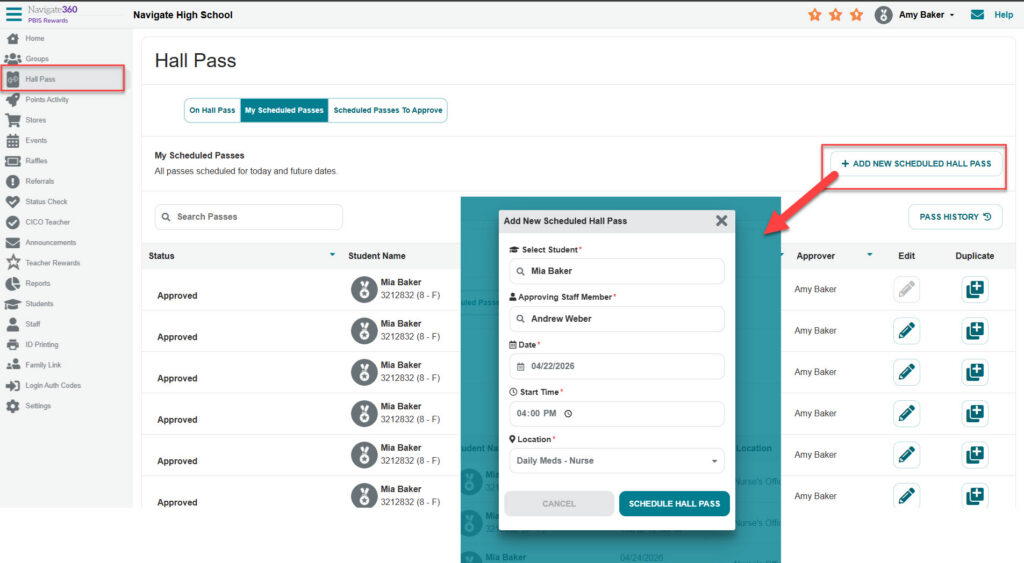
Hall passes can now be scheduled in advance by staff. Once a scheduled pass is approved, it will automatically issue at the scheduled time, assuming the student isn’t already on a hall pass
To use this feature, an Admin will enable it by selecting “Settings” and then “Hall Pass.” In the “Hall Pass Menu Tab – Staff Settings” section, the admin will check “Allow staff to schedule hall passes in advance.” This will make the Hall Pass tab visible to all users in the system, where they can see existing and create new scheduled hall passes.
More details:
- Created scheduled passes can be duplicated in the main hall pass tab for ease of creating recurring passes.
- Unapproved Scheduled Passes will be available to view in the “Schedule Passes to Approve” tab.
-
A “Scheduled Hall Pass Notification” will appear on the screen of the Approving Staff Member.
Live Leaderboard:
The live leaderboard will display a screen that shows the top points earners over a time period. It updates in real time, with new points showing up as stars that float across the screen and the top ten students reorder themselves.
To use this feature, an Admin can go to “Reports” then select the “Points” reports. Next choose “Points by Student Report,” then click the new “Live Leaderboard” button.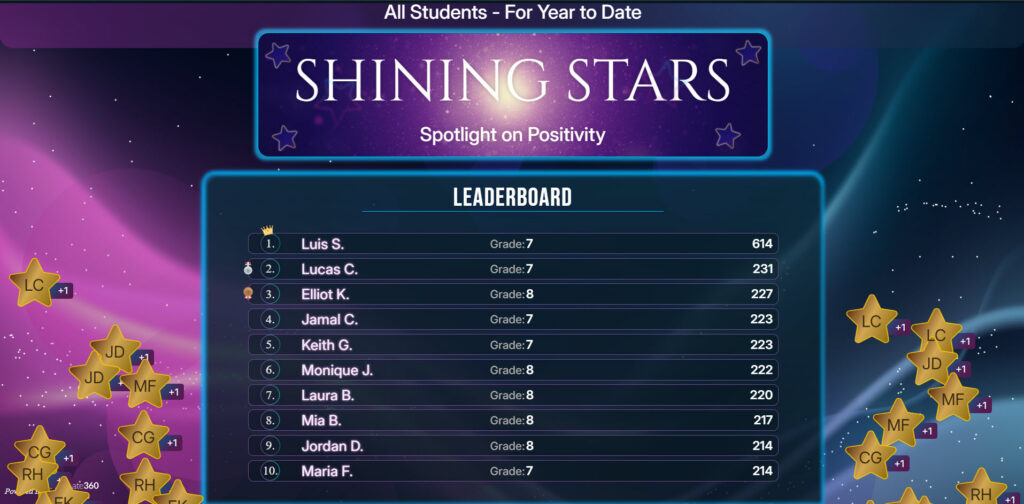
PBISR Family App Hall Pass Visibility/Navigate360 Hall Pass Family App:
The PBISR Family app now displays hall pass information about connected students. Guardians can see a the number of hall passes their student has been on in a day and a history of their hall pass usage
Additionally, we’ve launched a separate stand alone family app for Navigate360 Hall Pass. It’s a mirror of the PBISR family app, the same way the stand alone staff/student apps are.
Other updates:
Student search/lookup on the store page allows the user to search for a student before selecting an item.
Added random button to house and grade groups.
Quiet time hours setting now automatically populates an empty time slot if enabling the feature with no time slots previously set.
Added individual teacher view to admin points by student report.